| Starting with version 5.40, DrzTrack contains an
automatic interface to the OZ9AAR SkyScanner program. SkyScanner
allows you to map the noise sources in your area by automatically moving
your antenna to a group of chosen headings and taking noise readings at
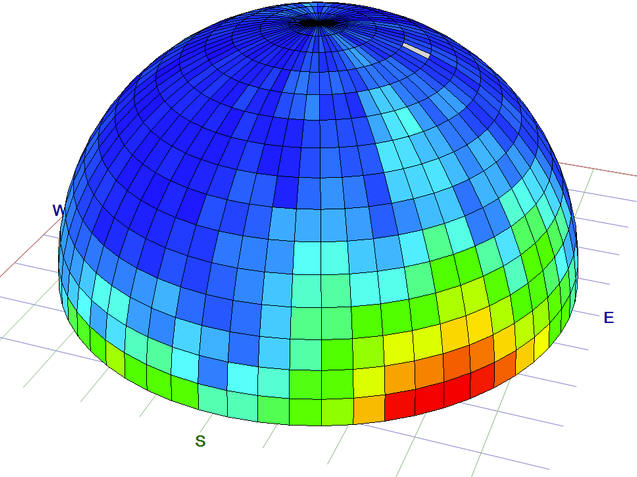
each location. While doing so, it builds a map of your noisy and
quiet headings. The picture below shows an example sky map that
SkyScanner can build. See
https://www.moonbounce.dk/hamradio/skyscanner.html for more
information on installing and using SkyScanner.
|
|
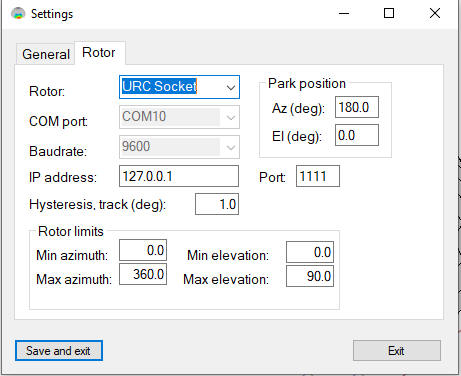
| To configure SkyScanner to operate with DrzTrack,
start SkyScanner and open the settings dialog, selecting the 'Rotor'
tab.
The Rotor selection must be 'URC Socket'. COM Port and Baudrate are not used. IP address is the address of the computer that DrzTrack is running on. Normally that will be the same computer that SkyScanner is on, so you can just use 127.0.0.1 as shown to the left. Hysteresis controls how close to each heading your antenna must be before SkyScanner considers it to be there. For most situations 2 degrees should be good. However it is important to make sure that SkyScanners hysteresis is not greater than that of DrzTrack. Otherwise DrzTrack will decide that the antenna is correctly positioned while SkyScanner is still waiting for it to get there. This results in SkyScanner waiting forever (until you stop it from scanning). See next pane for details. Make sure the port is set to 1111 and you are done. DrzTrack will now send antenna position to SkyScanner, and will move the antenna to the positions that SkyScanner requests. Normally DrzTrack and SkyScanner interoperate well, but if they lose communication with each other, you may have to stop both and then restart both to get them working again. Usually it is best to start DrzTrack first. It will then be watching for messages from SkyScanner. You can tell if they are communicating because SkyScanner will show the current antenna positions. Be sure to look at Carsten (OZ9AAR)'s web site for more detail on using SkyScanner.
|
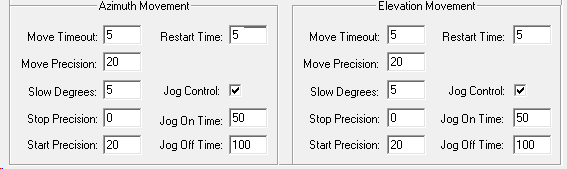
| Here is a partial snip of the Encoder Configuration
form in DrzTrack. There is a start and stop precision field at the
bottom of each movement direction. Here the stop precision is set
to zero, meaning that the antenna will stop when it reaches the exact
target position. However the position may drift past that location
after the motor is turned off. Assuming that the amount of
overshoot is less than 2 degrees, the antenna will stop and the
controller will wait until the moon has moved past the antenna position
by 2 degrees (note the precision values are degrees * 10). So all
is good for tracking, assuming that being within 2 degrees is
acceptable, but when using SkyScanner if the hysteresis set to 1 degree,
and the antenna overshoots by 1.5 degrees then SkyScanner would not
consider the antenna as having arrived, while DrzTrack does. The
antenna would never move back to where the scanner was happy with it and
the system is hung. To prevent this, either set DrzTrack to be
more precise, or set SkyScanner hysteresis to a larger value, In
this case 2 degrees for hysteresis would work.
|